<?xml version="1.0" encoding="utf-8"?>
<feed xmlns="http://www.w3.org/2005/Atom">
            <title type="text">SinYoung空间</title>
            <subtitle type="text">有花堪折直须折，莫待无花空折枝</subtitle>
    <updated>2024-07-20T23:54:40+08:00</updated>
        <id>https://www.sinyoung.site</id>
        <link rel="alternate" type="text/html" href="https://www.sinyoung.site" />
        <link rel="self" type="application/atom+xml" href="https://www.sinyoung.site/atom.xml" />
    <rights>Copyright © 2026, SinYoung空间</rights>
    <generator uri="https://halo.run/" version="1.6.1">Halo</generator>
            <entry>
                <title><![CDATA[搭建ollama  & open-webui & ragflow]]></title>
                <link rel="alternate" type="text/html" href="https://www.sinyoung.site/archives/搭建ollamaopen-webuiragflow" />
                <id>tag:https://www.sinyoung.site,2024-07-20:搭建ollamaopen-webuiragflow</id>
                <published>2024-07-20T23:51:34+08:00</published>
                <updated>2024-07-20T23:54:40+08:00</updated>
                <author>
                    <name>SinYoung</name>
                    <uri>https://www.sinyoung.site</uri>
                </author>
                <content type="html">
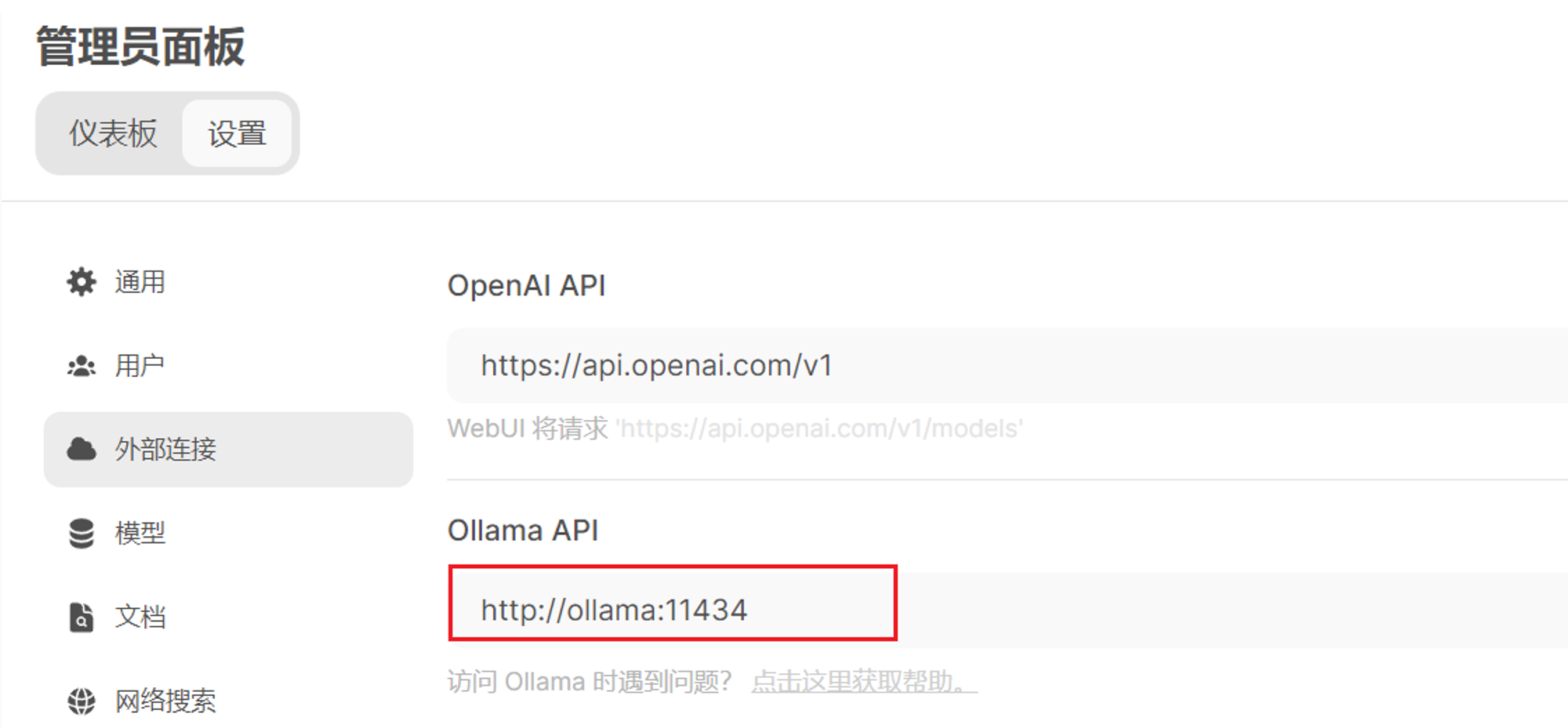
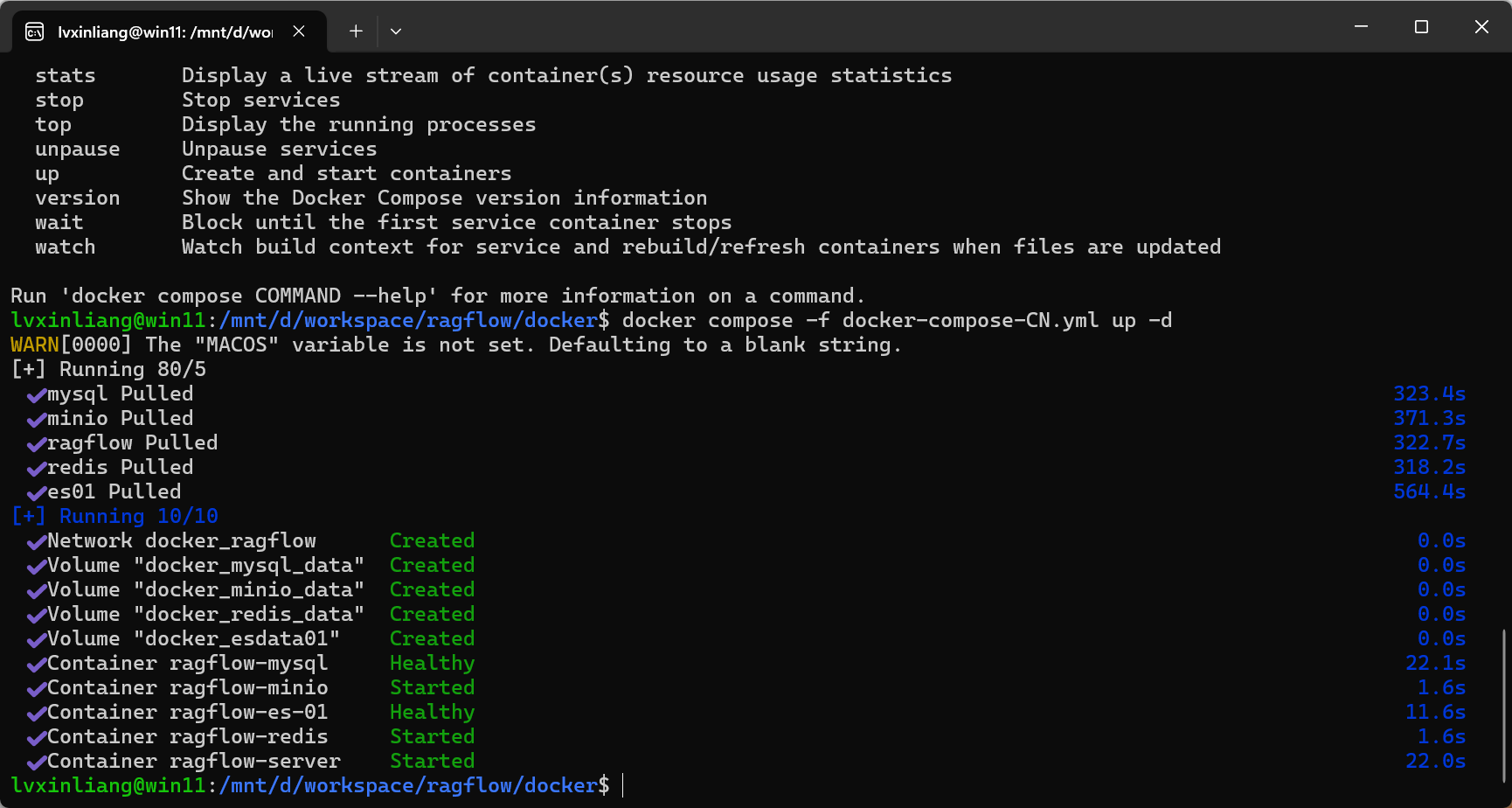
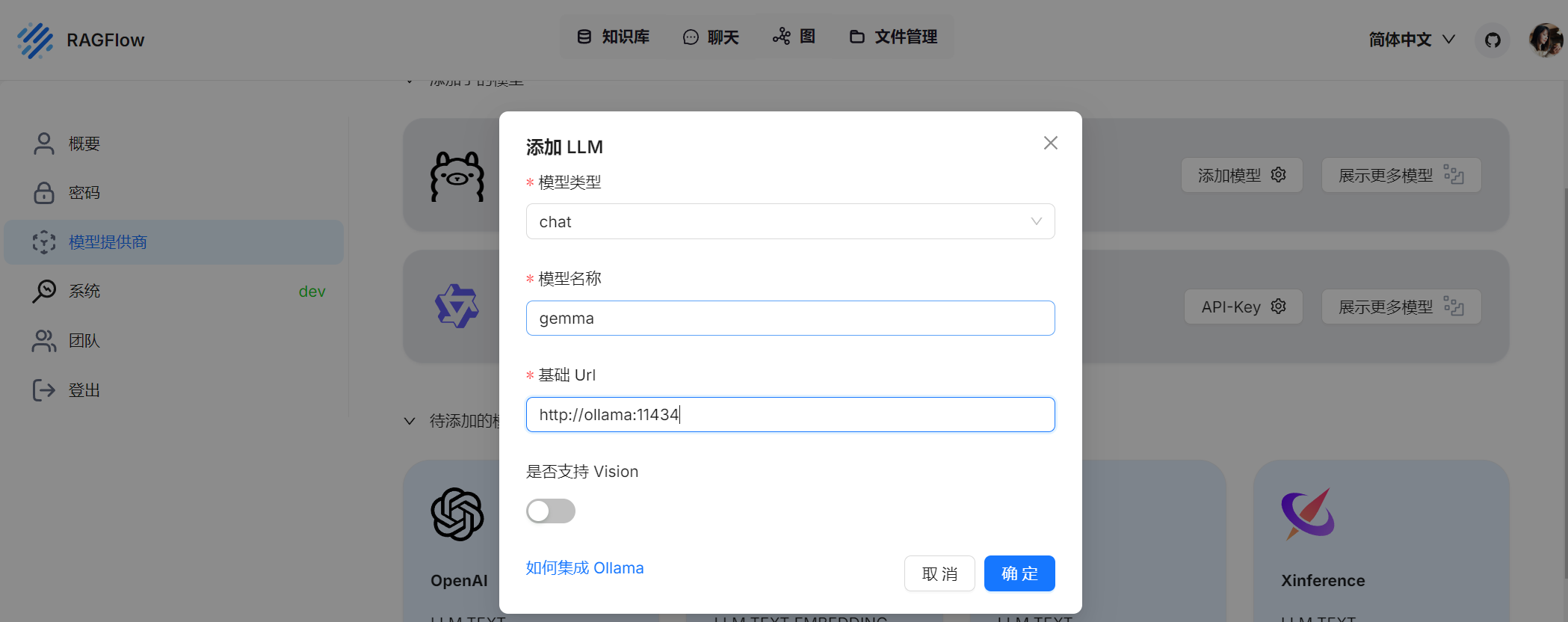
                        <![CDATA[<h1 id="%E7%8E%AF%E5%A2%83" tabindex="-1">环境</h1><ul><li>Windows 11系统，使用<code>wls</code></li><li>Windows 开启Clash VPN连接外网</li><li>docker 版本：26.1.4</li><li>docker-compose ：v2.27.1</li></ul><pre><code class="language-c">设备名称win11处理器13th Gen Intel(R) Core(TM) i7-13700KF   3.40 GHz机带 RAM32.0 GB (31.8 GB 可用)设备 ID84550625-3CC6-40FD-B602-9899F3FBBB92产品 ID00330-80000-00000-AA842系统类型64 位操作系统, 基于 x64 的处理器笔和触控没有可用于此显示器的笔或触控输入</code></pre><pre><code class="language-c">PS C:\Users\scien&gt; docker --versionDocker version 26.1.4, build 5650f9bPS C:\Users\scien&gt; docker-compose --versionDocker Compose version v2.27.1-desktop.1PS C:\Users\scien&gt; wsl --versionWSL 版本： 2.2.4.0内核版本： 5.15.153.1-2WSLg 版本： 1.0.61MSRDC 版本： 1.2.5326Direct3D 版本： 1.611.1-81528511DXCore 版本： 10.0.26091.1-240325-1447.ge-releaseWindows 版本： 10.0.22631.3880PS C:\Users\scien&gt; nvidia-smiSat Jul 20 23:20:18 2024+-----------------------------------------------------------------------------------------+| NVIDIA-SMI 555.99                 Driver Version: 555.99         CUDA Version: 12.5     ||-----------------------------------------+------------------------+----------------------+| GPU  Name                  Driver-Model | Bus-Id          Disp.A | Volatile Uncorr. ECC || Fan  Temp   Perf          Pwr:Usage/Cap |           Memory-Usage | GPU-Util  Compute M. ||                                         |                        |               MIG M. ||=========================================+========================+======================||   0  NVIDIA GeForce RTX 4070 Ti   WDDM  |   00000000:01:00.0  On |                  N/A ||  0%   37C    P2             35W /  285W |   11582MiB /  12282MiB |      1%      Default ||                                         |                        |                  N/A |+-----------------------------------------+------------------------+----------------------+lvxinliang@win11:/mnt/d/workspace/docker$ nvidia-smiSat Jul 20 23:20:05 2024       +-----------------------------------------------------------------------------------------+| NVIDIA-SMI 555.52.01              Driver Version: 555.99         CUDA Version: 12.5     ||-----------------------------------------+------------------------+----------------------+| GPU  Name                 Persistence-M | Bus-Id          Disp.A | Volatile Uncorr. ECC || Fan  Temp   Perf          Pwr:Usage/Cap |           Memory-Usage | GPU-Util  Compute M. ||                                         |                        |               MIG M. ||=========================================+========================+======================||   0  NVIDIA GeForce RTX 4070 Ti     On  |   00000000:01:00.0  On |                  N/A ||  0%   35C    P8              4W /  285W |   11609MiB /  12282MiB |      1%      Default ||                                         |                        |                  N/A |+-----------------------------------------+------------------------+----------------------++-----------------------------------------------------------------------------------------+| Processes:                                                                              ||  GPU   GI   CI        PID   Type   Process name                              GPU Memory ||        ID   ID                                                               Usage      ||=========================================================================================||    0   N/A  N/A         1      C   /python3.11                                 N/A      ||    0   N/A  N/A        27      C   /ollama_llama_server                        N/A      |+-----------------------------------------------------------------------------------------+</code></pre><h1 id="%E5%8D%95%E7%8B%AC%E6%90%AD%E5%BB%BAollama-%E4%B8%8E-open-webui" tabindex="-1">单独搭建ollama 与 open-webui</h1><pre><code class="language-bash">docker network create my_custom_networkdocker run -d --gpus=all -v ollama:/root/.ollama -p 11434:11434 --name ollama --hostname ollama --network my_custom_network ollama/ollamadocker run -d -p 3000:8080 --gpus all --add-host=host.docker.internal:host-gateway -v open-webui:/app/backend/data --name open-webui --network my_custom_network --restart always ghcr.io/open-webui/open-webui:cuda</code></pre><h3 id="%E9%85%8D%E7%BD%AE" tabindex="-1">配置</h3><p><img src="https://lsky.sinyoung.site/i/2024/07/20/669bdcd93f1d1.png" alt="1721490647234.png" /></p><h1 id="%E6%90%AD%E5%BB%BAragflow-%2Bollama-%2B-open-webui" tabindex="-1">搭建ragflow +ollama + open-webui</h1><h3 id="%E8%BF%90%E8%A1%8Cragflow" tabindex="-1">运行ragflow</h3><p>按照<a href="https://github.com/infiniflow/ragflow/blob/main/README_zh.md" target="_blank">https://github.com/infiniflow/ragflow/blob/main/README_zh.md</a>中的快速开始</p><pre><code class="language-c">docker compose -f docker-compose-CN.yml up -d</code></pre><p><img src="https://lsky.sinyoung.site/i/2024/07/20/669bdb9545e7b.png" alt="" /></p><h3 id="%E6%9F%A5%E7%9C%8Bdocker%E5%86%85%E7%BD%91%E7%BB%9C%E4%BF%A1%E6%81%AF" tabindex="-1">查看docker内网络信息</h3><pre><code class="language-c">lvxinliang@win11:/mnt/d/workspace/docker$ docker network lsNETWORK ID     NAME                DRIVER    SCOPE5741ae3858b7   bridge              bridge    local0a607a9761fb   docker_ragflow      bridge    local95d9ff87fd11   host                host      localaffe05591fd6   my_custom_network   bridge    localb25daea68bd3   none                null      local</code></pre><h3 id="docker%E8%BF%90%E8%A1%8C%E9%95%9C%E5%83%8F%E5%B9%B6%E6%8C%87%E5%AE%9A%E7%BD%91%E7%BB%9C" tabindex="-1">docker运行镜像并指定网络</h3><pre><code class="language-bash">docker run -d --gpus=all -v ollama:/root/.ollama -p 11434:11434 --name ollama --hostname ollama --network docker_ragflow ollama/ollamadocker run -d -p 3000:8080 --gpus all --add-host=host.docker.internal:host-gateway -v open-webui:/app/backend/data --name open-webui --network docker_ragflow --restart always ghcr.io/open-webui/open-webui:cuda</code></pre><p><img src="https://lsky.sinyoung.site/i/2024/07/20/669bdb8164a83.png" alt="" /></p><h3 id="%E7%99%BB%E5%BD%95%E5%B9%B6%E9%85%8D%E7%BD%AE" tabindex="-1">登录并配置</h3><p>登录<a href="http://127.0.0.1/login" target="_blank">http://127.0.0.1/login</a>地址<br /><img src="https://lsky.sinyoung.site/i/2024/07/20/669bdb41e53f0.png" alt="" /></p>]]>
                </content>
            </entry>
            <entry>
                <title><![CDATA[update-alternatives 命令]]></title>
                <link rel="alternate" type="text/html" href="https://www.sinyoung.site/archives/update-alternatives-ming-ling" />
                <id>tag:https://www.sinyoung.site,2024-05-27:update-alternatives-ming-ling</id>
                <published>2024-05-27T22:16:05+08:00</published>
                <updated>2024-05-27T22:16:05+08:00</updated>
                <author>
                    <name>SinYoung</name>
                    <uri>https://www.sinyoung.site</uri>
                </author>
                <content type="html">
                        <![CDATA[<p><code>update-alternatives</code> 是一个用于管理符号链接的工具，允许在多个版本的可执行文件、库、手册页等之间进行选择。以下是一些常用的 <code>update-alternatives</code> 命令和它们的用途：</p><h3 id="%E5%AE%89%E8%A3%85%E6%96%B0%E6%9B%BF%E4%BB%A3%E9%A1%B9" tabindex="-1">安装新替代项</h3><pre><code class="language-sh">sudo update-alternatives --install &lt;link&gt; &lt;name&gt; &lt;path&gt; &lt;priority&gt;</code></pre><ul><li><code>&lt;link&gt;</code>：这是主符号链接的路径，用户最终使用的命令。</li><li><code>&lt;name&gt;</code>：这是替代项组的名字，标识一组相关的替代项。</li><li><code>&lt;path&gt;</code>：这是具体的替代项路径，即指向的具体文件或可执行文件。</li><li><code>&lt;priority&gt;</code>：这是替代项的优先级，数值越高优先级越高。</li></ul><p><strong>示例：</strong></p><pre><code class="language-sh">sudo update-alternatives --install /usr/bin/python python /usr/bin/python3.8 1sudo update-alternatives --install /usr/bin/python python /usr/bin/python3.9 2</code></pre><p>这会创建一个名为 <code>python</code> 的替代项组，并添加两个替代项。默认情况下，由于 3.9 的优先级更高，<code>/usr/bin/python</code> 将指向 <code>/usr/bin/python3.9</code>。</p><h3 id="%E6%98%BE%E7%A4%BA%E5%BD%93%E5%89%8D%E7%9A%84%E6%9B%BF%E4%BB%A3%E9%A1%B9%E9%85%8D%E7%BD%AE" tabindex="-1">显示当前的替代项配置</h3><pre><code class="language-sh">update-alternatives --display &lt;name&gt;</code></pre><ul><li><code>&lt;name&gt;</code>：替代项组的名字。</li></ul><p><strong>示例：</strong></p><pre><code class="language-sh">update-alternatives --display python</code></pre><p>这会显示名为 <code>python</code> 的替代项组的详细信息，包括当前的符号链接路径和所有可用的替代项。</p><h3 id="%E6%89%8B%E5%8A%A8%E9%80%89%E6%8B%A9%E6%9B%BF%E4%BB%A3%E9%A1%B9" tabindex="-1">手动选择替代项</h3><pre><code class="language-sh">sudo update-alternatives --config &lt;name&gt;</code></pre><ul><li><code>&lt;name&gt;</code>：替代项组的名字。</li></ul><p><strong>示例：</strong></p><pre><code class="language-sh">sudo update-alternatives --config python</code></pre><p>这会列出所有可用的替代项，并允许你手动选择一个替代项作为默认值。</p><h3 id="%E6%9B%B4%E6%96%B0%E6%9B%BF%E4%BB%A3%E9%A1%B9" tabindex="-1">更新替代项</h3><pre><code class="language-sh">sudo update-alternatives --set &lt;name&gt; &lt;path&gt;</code></pre><ul><li><code>&lt;name&gt;</code>：替代项组的名字。</li><li><code>&lt;path&gt;</code>：具体的替代项路径。</li></ul><p><strong>示例：</strong></p><pre><code class="language-sh">sudo update-alternatives --set python /usr/bin/python3.8</code></pre><p>这会将名为 <code>python</code> 的替代项组的符号链接设置为 <code>/usr/bin/python3.8</code>。</p><h3 id="%E5%88%A0%E9%99%A4%E6%9B%BF%E4%BB%A3%E9%A1%B9" tabindex="-1">删除替代项</h3><pre><code class="language-sh">sudo update-alternatives --remove &lt;name&gt; &lt;path&gt;</code></pre><ul><li><code>&lt;name&gt;</code>：替代项组的名字。</li><li><code>&lt;path&gt;</code>：具体的替代项路径。</li></ul><p><strong>示例：</strong></p><pre><code class="language-sh">sudo update-alternatives --remove python /usr/bin/python3.8</code></pre><p>这会从 <code>python</code> 替代项组中移除 <code>/usr/bin/python3.8</code>。</p><h3 id="%E5%AE%8C%E6%95%B4%E7%A4%BA%E4%BE%8B" tabindex="-1">完整示例</h3><p>假设你想管理 <code>python</code> 命令的多个版本：</p><ol><li><strong>安装不同的 Python 版本：</strong></li></ol><pre><code class="language-sh">sudo update-alternatives --install /usr/bin/python python /usr/bin/python2.7 1sudo update-alternatives --install /usr/bin/python python /usr/bin/python3.8 2sudo update-alternatives --install /usr/bin/python python /usr/bin/python3.9 3</code></pre><ol start="2"><li><strong>查看当前配置：</strong></li></ol><pre><code class="language-sh">update-alternatives --display python</code></pre><ol start="3"><li><strong>手动选择默认版本：</strong></li></ol><pre><code class="language-sh">sudo update-alternatives --config python</code></pre><ol start="4"><li><strong>设置特定版本为默认：</strong></li></ol><pre><code class="language-sh">sudo update-alternatives --set python /usr/bin/python3.8</code></pre><ol start="5"><li><strong>移除某个版本：</strong></li></ol><pre><code class="language-sh">sudo update-alternatives --remove python /usr/bin/python2.7</code></pre><p>通过这些命令，你可以方便地管理系统中多个版本的软件，并根据需要切换默认版本。</p>]]>
                </content>
            </entry>
            <entry>
                <title><![CDATA[编译立创泰山派Linux buildroot]]></title>
                <link rel="alternate" type="text/html" href="https://www.sinyoung.site/archives/bian-yi-li-chuang-tai-shan-pai-linuxbuildroot" />
                <id>tag:https://www.sinyoung.site,2024-05-27:bian-yi-li-chuang-tai-shan-pai-linuxbuildroot</id>
                <published>2024-05-27T21:37:45+08:00</published>
                <updated>2024-05-27T22:09:43+08:00</updated>
                <author>
                    <name>SinYoung</name>
                    <uri>https://www.sinyoung.site</uri>
                </author>
                <content type="html">
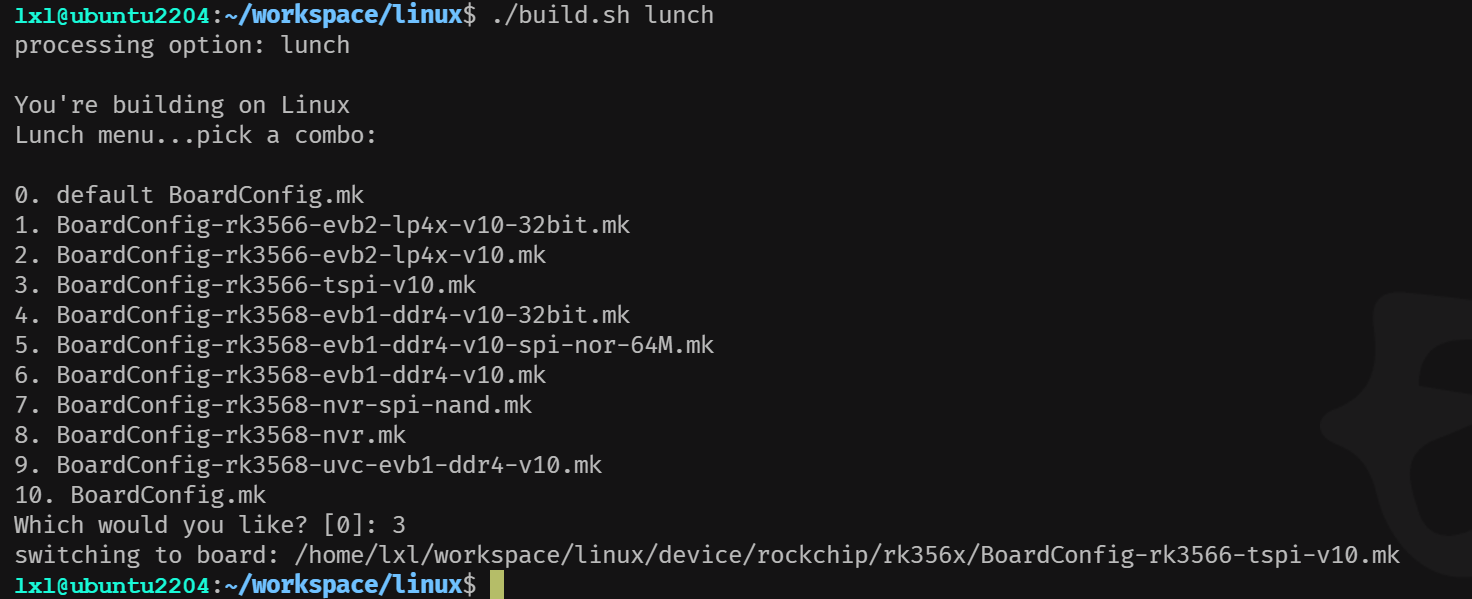
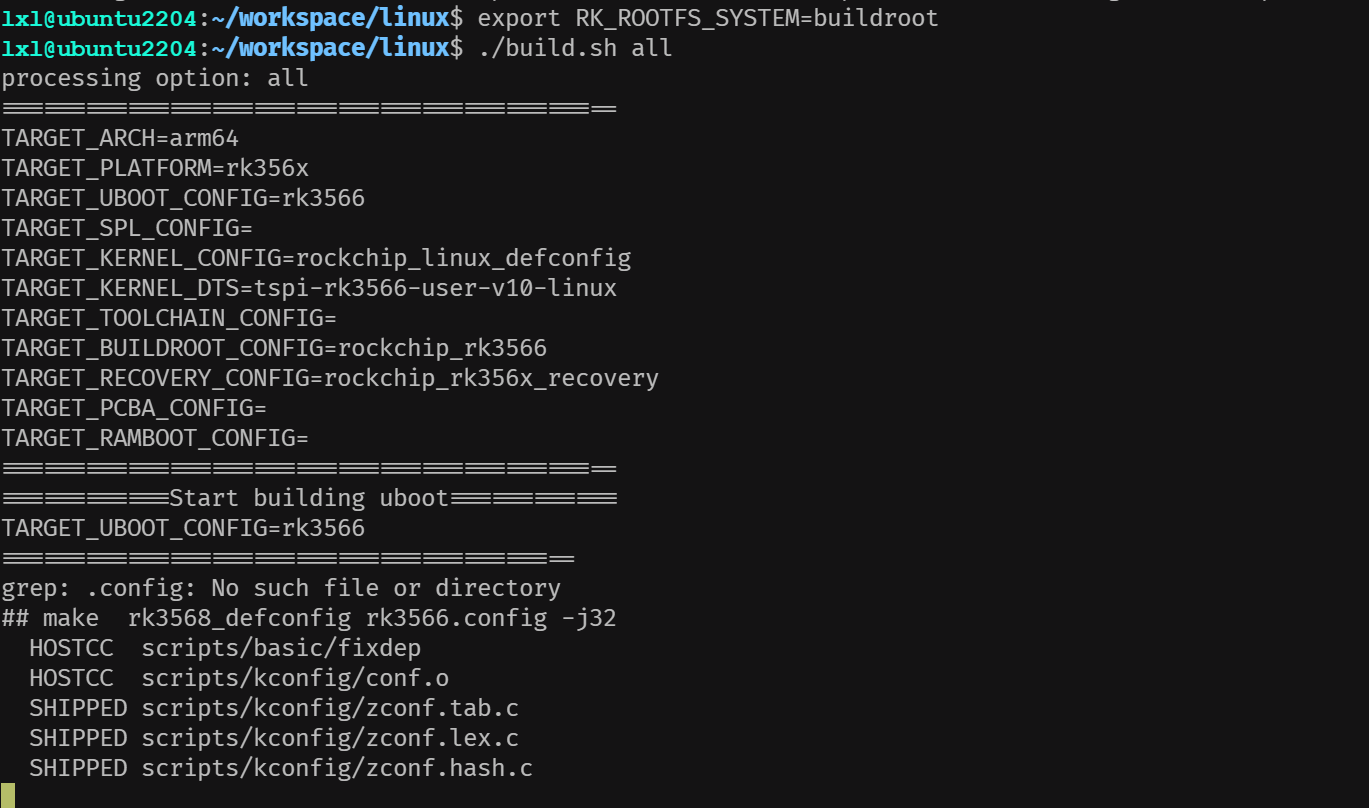
                        <![CDATA[<h3 id="%E7%8E%AF%E5%A2%83" tabindex="-1">环境</h3><pre><code class="language-">lxl@ubuntu2204:~/workspace/linux$ uname -aLinux ubuntu2204 6.5.0-35-generic #35~22.04.1-Ubuntu SMP PREEMPT_DYNAMIC Tue May  7 09:00:52 &gt; UTC 2 x86_64 x86_64 x86_64 GNU/Linux</code></pre><h4 id="%E8%AE%BE%E7%BD%AEpython" tabindex="-1">设置python</h4><p>设置python符号</p><pre><code class="language-">lxl@ubuntu2204:~/workspace/linux$ sudo update-alternatives --install /usr/bin/python3 python3 /usr/bin/python3.10 1lxl@ubuntu2204:~/workspace/linux$ sudo update-alternatives --install /usr/bin/python2 python2 /usr/bin/python2.7 1lxl@ubuntu2204:~/workspace/linux$ sudo update-alternatives --install /usr/bin/python python /usr/bin/python2.7 1</code></pre><p>查看python版本设置</p><pre><code class="language-">lxl@ubuntu2204:~/workspace/linux$ sudo update-alternatives --list python3/usr/bin/python3.10lxl@ubuntu2204:~/workspace/linux$ sudo update-alternatives --list python2/usr/bin/python2.7lxl@ubuntu2204:~/workspace/linux$ sudo update-alternatives --list python/usr/bin/python2.7/usr/bin/python3.10</code></pre><p>设置当前python</p><pre><code class="language-">lxl@ubuntu2204:~/workspace/linux$ sudo update-alternatives --config python有 2 个候选项可用于替换 python (提供 /usr/bin/python)。  选择       路径               优先级  状态------------------------------------------------------------  0            /usr/bin/python2.7    1         自动模式* 1            /usr/bin/python2.7    1         手动模式  2            /usr/bin/python3.10   1         手动模式要维持当前值[*]请按&lt;回车键&gt;，或者键入选择的编号：1</code></pre><h3 id="%E7%BC%96%E8%AF%91" tabindex="-1">编译</h3><h4 id="%E4%B8%8B%E8%BD%BDsdk%E5%8C%85" tabindex="-1">下载SDK包</h4><p>tspi_linux_sdk_repo_20240131.tar.gz  <a href="https://tmp.link/f/65f7265e94536" target="_blank">https://tmp.link/f/65f7265e94536</a><br />buildroot_dl_4c7c9df616fb.tar.gz  <a href="https://tmp.link/f/65f6ed15eb919" target="_blank">https://tmp.link/f/65f6ed15eb919</a><br />详见 <a href="https://lceda001.feishu.cn/wiki/RcTzwNhgeiX57ckmYKPcHpunnWb" target="_blank">https://lceda001.feishu.cn/wiki/RcTzwNhgeiX57ckmYKPcHpunnWb</a></p><h4 id="%E8%A7%A3%E5%8E%8B" tabindex="-1">解压</h4><ol><li>创建<code>linux</code>目录</li><li>将<code>tspi_linux_sdk_repo_20240131.tar.gz</code>解压到<code>linux</code>目录中，注意：解压后的全部文件会保存到<code>.repo</code>中</li><li>将<code>buildroot_dl_4c7c9df616fb.tar.gz</code>也解压到<code>linux</code>目录中，注意：解压后会放到<code>buildroot/dl/</code>中</li></ol><h4 id="sync-reop" tabindex="-1">sync reop</h4><p>使用<code>.repo/repo/repo sync -l -j88</code>从repo中拉取项目</p><h3 id="%E9%80%89%E6%8B%A9%E6%B3%B0%E5%B1%B1%E6%B4%BE%E9%85%8D%E7%BD%AE" tabindex="-1">选择泰山派配置</h3><p><code>./build.sh lunch</code><br /><img src="https://lsky.sinyoung.site/i/2024/05/27/665483829c121.png" alt="1716814721561.png" /></p><h4 id="%E7%BC%96%E8%AF%91-1" tabindex="-1">编译</h4><p>选择buildroot</p><pre><code class="language-">export RK_ROOTFS_SYSTEM=buildroot        #注意每次关闭窗口以后要重新运行./build.sh all         # 只编译模块代码（将all可以换成u-Boot，kernel，Rootfs，Recovery）</code></pre><p><img src="https://lsky.sinyoung.site/i/2024/05/27/665483b8ef53d.png" alt="1716814776051.png" /></p><h4 id="%E9%85%8D%E7%BD%AE%E5%BC%95%E8%84%9A%E7%94%B5%E6%BA%90" tabindex="-1">配置引脚电源</h4><table><thead><tr><th>引脚</th><th>PMUIO2</th><th>VCCIO1</th><th>VCCIO3</th><th>VCCIO4</th><th>VCCIO5</th><th>VCCIO6</th><th>VCCIO7</th></tr></thead><tbody><tr><td>1.8 V(1800000)</td><td></td><td></td><td></td><td>√</td><td></td><td>√</td><td></td></tr><tr><td>3.3 V(3300000)</td><td>√</td><td>√</td><td>√</td><td></td><td>√</td><td></td><td>√</td></tr></tbody></table><h4 id="%E6%89%93%E5%8C%85" tabindex="-1">打包</h4><p>打包<code>./mkfirmware.sh</code></p><hr /><h3 id="%E5%8F%82%E8%80%83" tabindex="-1">参考</h3><ul><li><a href="https://lceda001.feishu.cn/wiki/SRaFwXXNUi5Lmtkf4nqcKhyxnJ3" target="_blank">https://lceda001.feishu.cn/wiki/SRaFwXXNUi5Lmtkf4nqcKhyxnJ3</a></li></ul>]]>
                </content>
            </entry>
            <entry>
                <title><![CDATA[ALSA插件、 asound.conf配置文件]]></title>
                <link rel="alternate" type="text/html" href="https://www.sinyoung.site/archives/alsa-cha-jian-asoundconf-pei-zhi-wen-jian" />
                <id>tag:https://www.sinyoung.site,2024-05-27:alsa-cha-jian-asoundconf-pei-zhi-wen-jian</id>
                <published>2024-05-27T17:24:37+08:00</published>
                <updated>2024-05-27T17:24:37+08:00</updated>
                <author>
                    <name>SinYoung</name>
                    <uri>https://www.sinyoung.site</uri>
                </author>
                <content type="html">
                        <![CDATA[<blockquote><p>Alsa项目的官方网址：<a href="http://www.alsa-project.org/" target="_blank">http://www.alsa-project.org/</a><br />详细插件详细解释：<a href="https://www.alsa-project.org/alsa-doc/alsa-lib/pcm_plugins.html" target="_blank">https://www.alsa-project.org/alsa-doc/alsa-lib/pcm_plugins.html</a><br />Alsa LIB API Reference：<a href="http://www.alsa-project.org/alsa-doc/alsa-lib/" target="_blank">http://www.alsa-project.org/alsa-doc/alsa-lib/</a><br />配置文件的语法： <a href="http://www.alsa-project.org/alsa-doc/alsa-lib/conf.html" target="_blank">http://www.alsa-project.org/alsa-doc/alsa-lib/conf.html</a><br />Asoundrc的官方说明文档：<a href="http://www.alsa-project.org/main/index.php/" target="_blank">http://www.alsa-project.org/main/index.php/</a><br />Asoundrcarchlinux文档：<a href="https://wiki.archlinux.org/title/Advanced_Linux_Sound_Architecture/Configuration_examples" target="_blank">https://wiki.archlinux.org/title/Advanced_Linux_Sound_Architecture/Configuration_examples</a></p></blockquote><h1 id="%E9%85%8D%E7%BD%AE%E6%96%87%E4%BB%B6%E7%9A%84%E4%BD%8D%E7%BD%AE" tabindex="-1"><strong>配置文件的位置</strong></h1><p>配置文件的位置是由Configure阶段的选项来决定的，不过多数时候，Alsa的配置文件位于：<code>/usr/share/alsa</code>目录下，主要配置文件为<code>/usr/share/alsa/alsa.conf</code> 其它文件是否需要，位置在哪，都是由alsa.conf来决定的。</p><p>通常会有<code>/usr/share/alsa/card</code>和<code>/usr/share/alsa/pcm</code>两个子目录，用于设置Card相关的参数，别名以及一些PCM默认设置。</p><p>此外，在alsa.conf中，通常还会引用 <code>/etc/asound.conf</code>和 <code>~/.asoundrc</code>这两个配置文件，这两个文件通常是放置你个人需要特殊设置的相关参数。按照Alsa官方文档的说法，1.0.9版本以后，这两个文件就不再是必要的，甚至是不应该需要的。至少是不推荐使用吧。不过，对于我来说，在嵌入式系统中使用，为了简单和方便测试，恰恰是需要修改这两个文件</p><p><strong>Alsa插件目录</strong></p><pre><code class="language-yaml">/ # ls /usr/lib/alsa-lib/libasound_module_ctl_arcam_av.solibasound_module_ctl_oss.solibasound_module_pcm_oss.solibasound_module_pcm_upmix.solibasound_module_pcm_usb_stream.solibasound_module_pcm_vdownmix.solibasound_module_rate_speexrate.solibasound_module_rate_speexrate_best.solibasound_module_rate_speexrate_medium.so</code></pre><h1 id="alsa.conf" tabindex="-1"><strong>Alsa.conf</strong></h1><p>Alsa.conf中主要的一些内容包括：用hook读取了/etc/asound.conf 和 ~/.asoundrc这两个配置文件：</p><pre><code class="language-">@hooks [    {        func load            files [            &quot;/etc/asound.conf&quot;            &quot;~/.asoundrc&quot;        ]        errors false    }]</code></pre><p>设置了default pcm的一些默认参数，如，默认使用Card 0 ，Device 0作为音频设备等等。</p><pre><code class="language-">defaults.ctl.card 0defaults.pcm.card 0defaults.pcm.device 0defaults.pcm.subdevice -1defaults.pcm.nonblock 1defaults.pcm.ipc_key 5678293</code></pre><p>设置了Alsa 内置的一些plugin的接口参数，例如file：</p><pre><code class="language-">pcm.file {     @args [ FILE FORMAT ]     @args.FILE {         type string     }     @args.FORMAT {         type string         default raw     }     type file     slave.pcm null     file $FILE     format $FORMAT }</code></pre><p>File plugin的作用是将PCM数据流存储到文件中。此外，通常alsa.conf还会载入<code>/cards/aliases.conf</code> ，设置一些声卡的别名等，这个我是不需要了。在aliases.conf 的结尾还有以下一段：</p><pre><code class="language-"> &lt;confdir:pcm/default.conf&gt; &lt;confdir:pcm/dmix.conf&gt; &lt;confdir:pcm/dsnoop.conf&gt;</code></pre><p>用来读入<code>/usr/share/alsa/pcm</code>目录下所列的那3个文件分别设置 默认PCM设备的相关参数，dmix是用来实现播放时软件混音的内建plugin,dsnoop则是用来实现录音时多路分发的内建plugin。</p><h1 id="%E4%B8%80%E4%BA%9B%E9%85%8D%E7%BD%AE%E5%92%8C%E4%BD%BF%E7%94%A8%E5%AE%9E%E4%BE%8B" tabindex="-1"><strong>一些配置和使用实例</strong></h1><h1 id="%E4%BD%BF%E7%94%A8%E8%93%9D%E7%89%99%E8%AE%BE%E5%A4%87" tabindex="-1"><strong>使用蓝牙设备</strong></h1><ul><li>在<code>/etc/asound.conf</code>中添加下列一项用来使用蓝牙的A2DP设备</li></ul><pre><code class="language-">#device for bluetoothpcm.bluetooth{     type bluetooth     device 00:02:5B:00:C1:A0}</code></pre><p>然后调用 <code>aplay –D bluetooth sample.wav</code>播放。需要注意，为了使用该设备，你需要<code>/usr/lib/alsa-lib/libasound_module_pcm_bluetooth.so</code> 这一个蓝牙plugin的库文件。这是在Bluez相关的包里，和Alsa本身没有关系。从这里，我们也可以看出alsa的外部plugin和配置文件之间的名字关系规则：<code>libasound_module_pcm_####.so</code> 这里的#### 就是你再conf文件中<code>pcm.xxxx</code> 里所写的名字。</p><h1 id="%E4%BD%BF%E7%94%A8%E6%8C%87%E5%AE%9A%E8%8A%82%E7%82%B9" tabindex="-1"><strong>使用指定节点</strong></h1><p>在我的板子上，Buildin的Audio硬件在Alsa子系统中实现了两个硬件通道，一个是HIFI通道，另一个是语音通道，所以我添加了如下配置：</p><pre><code class="language-">#device for voice channelpcm.voice{    type plug    slave{        pcm &quot;hw:0,1&quot;    }}</code></pre><p>通过语音通道播放声音的调用的方式： <code>aplay –D voice sample.wav</code>这样的写法说明我通过plug这plugin对音频数据进行自动的采样率，通道等调整后，将数据送到我的第0个card的序号为1的device上。实际上，如果不写上述配置文件，用<code>aplay -D &quot;plug:SLAVE='hw:0,1'&quot; sample.wav</code>也可以得到同样的结果。</p><p>Hifi通道播放声音直接使用aplay sample.wav即可 也就是<code>aplay –D default sample.wav</code></p><h1 id="s16_le%E8%BD%AC%E6%8D%A2s32_le" tabindex="-1"><strong>S16_LE转换S32_LE</strong></h1><p>通过<code>arecord -D ref -c2 -r32000 -fS32_LE /data/rec.wav</code>命令可以采集到<code>S32_LE</code>数据，<code>hw:0,0</code>只支持<code>format S16_LE</code>，slave指定使用<code>S16_LE</code>采集（必须指定否则会根据命令行参数使用<code>S32_LE</code>进行采集），通过plugin转成<code>S32_LE</code></p><pre><code class="language-">pcm.ref {    type plug    slave {        pcm &quot;hw:0,0&quot;        format S16_LE    }}</code></pre><h1 id="%E5%A4%9A%E9%80%9A%E9%81%93%E7%BB%84%E5%90%88%E8%99%9A%E6%8B%9F%E5%A3%B0%E5%8D%A1" tabindex="-1"><strong>多通道组合虚拟声卡</strong></h1><p>使用<code>aplay -Dhw:0,0 /data/cn_32k.wav &amp;</code>和<code>arecord -Dpcm.mu -f S32_LE -r 32000 -c 8 /data/rec_8ch.wav</code> 可以将回采信号和mic array信号复合到一个声卡中，并以32bit进行采集，回采信号不支持32bit，使用<code>ref</code>plugin转到了32bit。mic array使用32bit采集。通过<code>arecord -Dpcm.mu -f S32_LE -r 32000 -c 8 /data/rec_8ch.wav -v</code>可以清晰看到pipeline</p><pre><code class="language-">pcm.mu {    type multi    slaves.a.pcm &quot;hw:1,0&quot;    slaves.b.pcm ref    slaves.a.channels 8    slaves.b.channels 2    bindings.0.slave a    bindings.0.channel 0    bindings.1.slave a    bindings.1.channel 1    bindings.2.slave a    bindings.2.channel 2    bindings.3.slave a    bindings.3.channel 3    bindings.4.slave a    bindings.4.channel 4    bindings.5.slave a    bindings.5.channel 5    bindings.6.slave b    bindings.6.channel 0    bindings.7.slave b    bindings.7.channel 1}# Sends to the two dmix interfacespcm.quad {    type multi# Necessary to have both slaves be dmix; both as hw doesn&#39;t give errors, but wouldn&#39;t    slaves.a.pcm &quot;dmixerout&quot;    slaves.a.channels 2    slaves.b.pcm &quot;dmixerloop&quot;    slaves.b.channels 2    bindings {        0 { slave a; channel 0; }        1 { slave a; channel 1; }        2 { slave b; channel 0; }        3 { slave b; channel 1; }    }}</code></pre><h1 id="softvol%EF%BC%9A" tabindex="-1"><strong>softvol：</strong></h1><p>实现软件调节音量</p><pre><code class="language-">pcm.softvol {    type softvol    slave.pcm &quot;playback&quot;    control {        name &quot;playback_softvol&quot;        card 2    }    min_dB -40.0    max_dB 0.0    resolution 100}</code></pre><p>创建了一个<code>softvol</code>PCM设备，其音量由名为<code>playback_softvol</code>的新音量控件控制音量改变的音频流将被传送到<code>playback</code>设备。由于该插件没有任何变化，因此新设备的音量，采样格式，采样率 和通道数与从设备的值相同。</p><ul><li>首次使用新定义的设备只有使用一次新PCM设备后，才会出现<code>playback_softvol</code>控件，同时也可以通过<code>alsamixer</code> <code>amixer</code>调节音量</li></ul><pre><code class="language-">aplay -D softvol /data/test.wavamixer contents -c2amixer cset -c2 numid=53,iface=MIXER,name=&#39;playback_softvol&#39; 10</code></pre><h1 id="dmix%E6%8F%92%E4%BB%B6%EF%BC%9A" tabindex="-1"><strong>dmix插件：</strong></h1><p>dmix插件只能用于播放<code>aplay -D real_playback sample.wav &amp;</code>你可以通过多次调用上述命令来测试多个音频数据的混音。也可以使用<code>aplay -D dmix sample.wav &amp;</code>调用内置dmix</p><pre><code class="language-">pcm.real_playback {    type dmix    ipc_key 5978293# must be unique for all dmix plugins!!!!    ipc_key_add_uid yes    slave {        pcm &quot;hw:0,0&quot;        channels 2        rate 48000        period_size 1024        buffer_size 4096    }    bindings {        0 0        1 1    }}</code></pre><ul><li>Dump音频数据：<code>aplay -D &quot;plug:'file:FILE=/tmp/dump.bin'&quot; sample.wav</code></li></ul><h1 id="%E5%AE%9A%E4%B9%89%E4%B8%80%E7%BB%84%E8%BE%93%E5%85%A5%E8%BE%93%E5%87%BA%E8%AE%BE%E5%A4%87" tabindex="-1"><strong>定义一组输入输出设备</strong></h1><pre><code class="language-">pcm.uac {    type asym    playback.pcm {        type plug        slave.pcm &quot;uac_playback&quot;    }    capture.pcm {        type plug        slave.pcm &quot;uac_capture&quot;    }}</code></pre><h3 id="downmix-%E6%8F%92%E4%BB%B6" tabindex="-1">DownMix 插件</h3><p>使用-v 可以看到详细的<strong>Transformation table</strong></p><pre><code class="language-yaml">pcm.uac_capture_mono {    type vdownmix    slave.pcm &quot;uac_capture&quot;    slave.channels 2    ttable {        0.0 0.5        0.1 0.5    }}/ # arecord -D uac_capture_mono -c1 -r48000 -fS16_LE /data/rec.wav -vRecording WAVE &#39;/data/rec.wav&#39; : Signed 16 bit Little Endian, Rate 48000 Hz, MonoRoute conversion PCM  Transformation table:    0 &lt;- 0*0.5 + 1*0.5    1 &lt;- 0*0.5Its setup is:  stream       : CAPTURE  access       : RW_INTERLEAVED  format       : S16_LE  subformat    : STD  channels     : 1  rate         : 48000</code></pre><h1 id="route-%E6%8F%92%E4%BB%B6" tabindex="-1">R<strong>oute 插件</strong></h1><h3 id="arecord" tabindex="-1">arecord</h3><p>与downmix类似将2通道音频downmix到1通道</p><pre><code class="language-yaml">pcm.uac_capture_mono {    type route    slave.pcm &quot;uac_capture&quot;    slave.channels 2    ttable {        0.0 0.5        0.1 0.5    }}    ttable {        master.slave gain        master.slave gain    }-v 可以查看详细转换关系：Slave #1: Route conversion PCM  Transformation table:    0 &lt;- 0*0.5 + 1*0.5    </code></pre><h3 id="aplay" tabindex="-1">aplay</h3><pre><code class="language-yaml">pcm.uac_playback_mono {    type route    slave.pcm &quot;uac_playback&quot;    slave.channels 2    ttable {        0.0 1        0.1 1    }}Slave #0: Route conversion PCM  Transformation table:    0 &lt;- 0 * 1    1 &lt;- 0 * 1</code></pre><p>route plugin将2ch数据映射输出到4ch的multi插件中</p><pre><code class="language-"># Duplicates to quad, use this to output to loopback &amp; externalpcm.stereo2quad { type route slave.pcm &quot;quad&quot; # ttable.A.B G # where A - master channel #       B - slave channel #       G - volume gain (1.0 = original) ttable.0.0 1 ttable.1.1 1 ttable.0.2 1 ttable.1.3 1}</code></pre><pre><code class="language-">pcm.sub0_route {    type route    slave.pcm sub0_multi    ttable [        [1 0 1 0]  # ch0 映射到 ch0/ch2        [0 1 0 1]  # ch1 映射到 ch1/ch3    ]}pcm.sub0_multi {    type multi    slaves.a.pcm main_proxy    slaves.b.pcm sub0_dst    slaves.a.channels 2    slaves.b.channels 2    bindings.0.slave a    bindings.0.channel 0    bindings.1.slave a    bindings.1.channel 1    bindings.2.slave b    bindings.2.channel 0    bindings.3.slave b    bindings.3.channel 1}</code></pre><h1 id="dsnoop-%E6%8F%92%E4%BB%B6" tabindex="-1"><strong>dsnoop 插件</strong></h1><p>dsnoop插件用于录音场景，将一个捕获流拆分为多个捕获流。它的工作方式与dmix插件相反，多个客户端同时读取共享捕获缓冲区。以下参数的含义与dmix插件几乎相同。</p><pre><code class="language-">pcm.cap_share {    type dsnoop    ipc_key 112233    slave {        pcm &quot;hw:0,5&quot;        channels 8        rate 32000    }}</code></pre><h1 id="resample-%E6%8F%92%E4%BB%B6" tabindex="-1"><strong>resample 插件</strong></h1><pre><code class="language-yaml"># defaults.pcm.rate_converter &quot;speexrate_medium&quot;pcm.uac_playback {    type rate             # 定义使用采样率转换插件    slave {        pcm &quot;hw:2,0&quot;      # 硬件设备        rate 48000        # 表示从src_rate转成48k最终播放出去    }}</code></pre><p>需要编译<code>alsa-plugins</code>，</p><pre><code class="language-">ls /usr/lib64/alsa-lib/libasound_module_libasound_module_ctl_arcam_av.solibasound_module_ctl_oss.solibasound_module_pcm_oss.solibasound_module_pcm_upmix.solibasound_module_pcm_usb_stream.solibasound_module_pcm_vdownmix.solibasound_module_rate_speexrate.solibasound_module_rate_speexrate_best.solibasound_module_rate_speexrate_medium.so</code></pre><h3 id="%E5%8F%A6%E5%A4%96card_no%E5%8F%AF%E4%BB%A5%E4%BD%BF%E7%94%A8card_name%E6%9B%BF%E6%8D%A2" tabindex="-1">另外<code>card_no</code>可以使用<code>card_name</code>替换</h3><pre><code class="language-yaml">pcm.wireless_playback {    type rate    slave {        pcm &quot;hw:u2wl,0&quot;        rate 48000    }}pcm.wireless_capture {    type rate    slave {        pcm &quot;hw:u2wl,0&quot;        rate 48000    }}pcm.softvol {    type softvol    slave.pcm &quot;playback&quot;    control {        name &quot;playback_softvol&quot;        card rockchipak7755    }    min_dB -50.0    max_dB 0.0    resolution 100}</code></pre><h3 id="%E8%8E%B7%E5%8F%96card***_no%2C-card_name%E6%96%B9%E5%BC%8F***" tabindex="-1">获取<code>card***_no</code>, <code>card_name</code>方式***</h3><p><em><strong>arecord -l<br />aplay -l<br />cat /proc/asound/cards</strong></em></p><pre><code class="language-yaml">#  cat /proc/asound/cards 0 [rockchiprk3308a]: rockchip_rk3308 - rockchip,rk3308-acodec                      rockchip,rk3308-acodec 1 [rockchippdmmica]: rockchip_pdm-mi - rockchip,pdm-mic-array                      rockchip,pdm-mic-array 2 [u2wl           ]: u2-wl - u2-wl                      u2-wl 3 [rockchipak7755 ]: rockchip_ak7755 - rockchip,ak7755                      rockchip,ak7755 4 [UAC1Gadget     ]: UAC1_Gadget - UAC1_Gadget                      UAC1_Gadget 0 7 [Loopback       ]: Loopback - Loopback                      Loopback 1</code></pre><h1 id="alsa-external-pcm-plugin-sdk-%EF%BC%88alsa%E6%89%A9%E5%B1%95%E6%8F%92%E4%BB%B6%EF%BC%89" tabindex="-1"><strong>ALSA External PCM plugin SDK （ALSA扩展插件）</strong></h1><ul><li>alsa从<code>/usr/lib/alsa-lib/</code>目录查找plugin，将<code>libasound_module_pcm_fellow.so</code> copy到<code>/usr/lib/alsa-lib</code>;并将<code>/usr/lib/alsa-lib</code>加到<code>/etc/ld.config</code>,否则有可能在运行时，找不到so</li><li>alsa plugin命名方式<code>libasound_module_pcm_XXX.so</code>，名为<code>XXX</code>的插件</li></ul><blockquote><p>相关资料：</p><ul><li>ALSA官方SDK：<a href="https://www.alsa-project.org/alsa-doc/alsa-lib/group___plugin___s_d_k.html" target="_blank">https://www.alsa-project.org/alsa-doc/alsa-lib/group___plugin___s_d_k.html</a></li><li><a href="https://www.cnblogs.com/fellow1988/tag/ALSA/" target="_blank">https://www.cnblogs.com/fellow1988/tag/ALSA/</a></li><li><a href="https://github.com/kulve/ufoleds" target="_blank">https://github.com/kulve/ufoleds</a></li></ul></blockquote><h1 id="alsa%E6%89%A9%E5%B1%95%E6%8F%92%E4%BB%B6%E5%88%86%E4%B8%BA2%E7%B1%BB%EF%BC%9A" tabindex="-1"><strong>ALSA扩展插件分为2类：</strong></h1><h3 id="external-filter-plugin" tabindex="-1">External Filter plugin</h3><blockquote><p><a href="https://www.cnblogs.com/fellow1988/p/12377713.html" target="_blank">https://www.cnblogs.com/fellow1988/p/12377713.html</a></p></blockquote><ol><li>滤波器类型插件，用于转换输入的PCM信号并输出到Slave。因此，该插件必须有Slave PCM 作为其输出。</li><li>该插件可以修改输入/输出PCM的<code>format</code>和<code>channel</code>。但是 <strong>不能</strong> 修改<code>rate</code>，因为只是过滤型plugin</li><li>在调用<code>snd_pcm_extplug_create()</code>之前，必须在<code>extplug</code>记录中填写以下字段 ：<code>version</code>、<code>name</code>、<code>callback</code>。其他字段(<code>private_data</code>、<code>parms</code>)是可选的，应初始化为零.</li><li>必须将常量<code>SND_PCM_EXTPLUG_VERSION</code>传递给 alsa-lib 中的版本检查的版本字段<code>version</code>。</li><li>必须将非 NULL ASCII 字符串传递给名称字段<code>name</code>。</li><li><code>callback</code>字段包含此插件的回调函数表（定义为<code>snd_pcm_extplug_callback_t</code>）。</li><li><code>private_data</code> 用户私有数据，在回调中引用私有数据</li></ol><pre><code class="language-cpp">#include &lt;stdio.h&gt;#include &lt;string.h&gt;#include &lt;unistd.h&gt;#include &lt;alsa/asoundlib.h&gt;#include &lt;alsa/pcm_external.h&gt;struct ctx_parms {    int frames;    int enable_dump;    FILE *dump_fp;    float gain;};typedef struct {    snd_pcm_extplug_t ext;    struct ctx_parms parms;    short *buf;    short *outbuf;    unsigned int filled;    unsigned int processed;}snd_pcm_fellowext_t;static inline void *area_addr(const snd_pcm_channel_area_t *area, snd_pcm_uframes_t offset){    unsigned int bitofs = area-&gt;first + area-&gt;step * offset;    return (char *)area-&gt;addr + bitofs / 8;}static void process(snd_pcm_fellowext_t *ctx){    int frames = ctx-&gt;parms.frames;    short *inbuf = ctx-&gt;buf;    short *outbuf= ctx-&gt;outbuf;    int channels= ctx-&gt;ext.channels;    int ch_idx = 0, frame_idx = 0;    for (frame_idx = 0; frame_idx &lt; frames; frame_idx++)    {        for (ch_idx = 0; ch_idx &lt; channels; ch_idx++)        {            outbuf[frame_idx * channels + ch_idx] = (short)((float)inbuf[frame_idx * channels + ch_idx] * ctx-&gt;parms.gain);        }    }}static snd_pcm_sframes_t fellowext_transfer(snd_pcm_extplug_t *ext, const snd_pcm_channel_area_t *dst_areas, snd_pcm_uframes_t dst_offset, snd_pcm_channel_area_t *src_areas, snd_pcm_uframes_t src_offset, snd_pcm_uframes_t size){    snd_pcm_fellowext_t *ctx = (snd_pcm_fellowext_t *)ext;    short *src = area_addr(src_areas, src_offset);    short *dst = area_addr(dst_areas, dst_offset);    unsigned int count = size;    int channels = ctx-&gt;ext.channels;    int bytes_per_frame = 2 * channels;    while (cout &gt; 0) {        unsigned int chunk;        if (ctx-&gt;filled + count &gt; ctx-&gt;parms.frames)            chunk = ctx-&gt;parms.frames - ctx-&gt;filled;        else            chunk = count;        if (ctx-&gt;processed)            memcpy(dst, ctx-&gt;outbuf + ctx-&gt;filled * channels, chunk * bytes_per_frame);        else            memset(dst, 0, chunk * bytes_per_frame);        if (ctx-&gt;parms.enable_dump)            fwrite(dst, 1, chunk * bytes_per_frame, ctx-&gt;parms.dump_fp);        dst += chunk * channels;        memcpy(ctx-&gt;buf + ctx-&gt;filled * channels, src, chunk * bytes_per_frame);        ctx-&gt;filled += chunk;        if (ctx-&gt;filled == ctx-&gt;parms.frames) {            process(ctx);            ctx-&gt;processed = 1;        }        src += chunk * channels;        count -= chunk;    }    return size;}static int fellowext_init(snd_pcm_extplug_t *ext){    snd_pcm_fellowext_t *ctx = (snd_pcm_fellowext_t *)ext;    int channels = ctx-&gt;ext.channels;    ctx-&gt;filled = 0;    ctx-&gt;processed = 0;    if (!ctx-&gt;buf) {        ctx-&gt;buf = malloc(ctx-&gt;parms.frames * 2 * channels);        if (!ctx-&gt;buf)            return -ENOMEM;    }    memset (ctx-&gt;buf, 0, ctx-&gt;parms.frames * 2 * channels);    if (!ctx-&gt;outbuf) {        ctx-&gt;outbuf = malloc(ctx-&gt;parms.frames * 2 * channels);        if (!ctx-&gt;outbuf)            return -ENOMEM;    }    memset (ctx-&gt;outbuf, 0, ctx-&gt;parms.frames * 2 * channels);    return 0;}static int fellowext_close(snd_pcm_extplug *ext){    snd_pcm_fellowext_t *ctx = (snd_pcm_fellowext_t *)ext;    if (ctx-&gt;parms.enable_dump)        fclose(ctx-&gt;parms.dump_fp);    if (ctx-&gt;buf) {        free(ctx-&gt;buf);        ctx-&gt;buf = NULL;    }    if (ctx-&gt;outbuf) {        free(ctx-&gt;outbuf);        ctx-&gt;outbuf = NULL;    }    return 0;}static const snd_pcm_extplug_callback_t fellowext_callback = {    .transfer = fellowext_transfer,    .init = fellowext_init,    .close = fellowext_close,};static int get_bool_parm(snd_config_t *n, const char *id, const char *str, int *val_ret){    int val;    if (strcmp(id, str))        return 0;    val = snd_config_get_bool(n);    if (val &lt; 0) {        SNDERR(&quot;Invalid value for %s&quot;, id );        return val;    }    *val_ret = val;    return 1;}static int get_int_parm(snd_config_t *n, const char *id, const char *str, int *val_ret){    long val;    int err;    if (strcmp(id, str))        return 0;    err = snd_config_get_integer(n, &amp;val);    if (err &lt; 0) {        SNDERR(&quot;Invalid value for %s&quot;, id );        return err;    }    *val_ret = val;    return 1;}static int get_float_parm(snd_config_t *n, const char *id, const char *str, float*val_ret){    double val;    int err;    if (strcmp(id, str))        return 0;    err = snd_config_get_ireal(n, &amp;val);    if (err &lt; 0) {        SNDERR(&quot;Invalid value for %s&quot;, id );        return err;    }    *val_ret = val;    return 1;}SND_PCM_PLUGIN_DEINE_FUNC(fellowext){    snd_config_iterator_t i, next;    snd_pcm_fellowext_t *ctx;    snd_config_t *sconf = NULL;    int err;    struct ctx_parms parms = {        .frames = 512,        .enable_dump = 0,        .dump_fp = NULL,        .gain = 0.5,    };    snd_config_for_each(i, next, conf) {        snd_config_t *n = snd_config_iterator_entry(i);        const char *id;        if (snd_config_get_id(n, &amp;id) &lt; 0)            continue;        if (strcmp(id, &quot;comment&quot;) == 0 || strcmp(id, &quot;type&quot;) == 0)            continue;        if (strcmp(id, &quot;slave&quot;) == 0) {            sconf = n;            continue;        }        err = get_int_parm(n, id, &quot;frames&quot;, &amp;parms.frames);        if (err)            goto ok;        err = get_bool_parm(n, id, &quot;enable_dump&quot;, &amp;parms.enable_dump);        if (err)            goto ok;        err = get_float_parm(n, id, &quot;gain&quot;, &amp;parms.gain);        if (err)            goto ok;        SNDERR(&quot;Unknown field %s&quot;, id);        return -EINVAL;    ok:         if (err &lt; 0)            return err;    }    if (!sconf) {        SNDERR(&quot;No slave configuration for fellowext pcm&quot;);    }    if (parms.enable_dump)        parms.dump_fp = fopen(&quot;extplug.pcm&quot;, &quot;wb&quot;);    ctx = calloc(1, sizeof(*ctx))    if (!ctx)        return -ENOMEM;    ctx-&gt;ext.version = SND_PCM_EXTPLUG_VERSION;    ctx-&gt;ext.name = &quot;Fellow Ext Plugin&quot;;    ctx-&gt;ext.callback = &amp;fellowext_callback;    ctx-&gt;ext.private_data = ctx;    ctx-&gt;parms = parms;    err = snd_pcm_extplug_create(&amp;ctx-&gt;ext, name, root, conf, stream, mode);    if (err &lt; 0) {        free(ctx);        return err;    }    snd_pcm_explug_set_param(&amp;ctx-&gt;ext, SND_PCM_EXTPLUG_HW_CHANNELS, 2);    snd_pcm_explug_set_slave_param(&amp;ctx-&gt;ext, SND_PCM_EXTPLUG_HW_CHANNELS, 2);    snd_pcm_explug_set_param(&amp;ctx-&gt;ext, SND_PCM_EXTPLUG_HW_FORMAT, SND_PCM_FORMAT_S16);    snd_pcm_explug_set_slave_param(&amp;ctx-&gt;ext, SND_PCM_EXTPLUG_HW_FORMAT, SND_PCM_FORMAT_S16);    *pcmp = ctx-&gt;ext.pcm;    return 0;}SND_PCM_PLUGIN_SYMBOL(fellowext);</code></pre><h3 id="external-i%2Fo-plugin-sdk" tabindex="-1">External I/O plugin SDK</h3><blockquote><p><a href="https://www.cnblogs.com/fellow1988/p/12375206.html" target="_blank">https://www.cnblogs.com/fellow1988/p/12375206.html</a></p></blockquote><ol><li>I/O 类型插件，用作输入或输出的最终端点，即作为用户空间 PCM 程序。</li></ol><h2 id="%E9%80%9A%E8%BF%87%E4%BB%A3%E7%A0%81%E8%AE%BE%E7%BD%AEalsa-%E9%9F%B3%E9%87%8F" tabindex="-1">通过代码设置alsa 音量</h2><ul><li><code>amixer -c2 cget name='playback_softvol’</code></li></ul><pre><code class="language-c">#include &lt;alsa/asoundlib.h&gt;#include &lt;iostream&gt;int main() {    snd_ctl_t *ctl;    snd_ctl_elem_id_t *id;    snd_ctl_elem_value_t *control;    snd_ctl_elem_id_alloca(&amp;id);    snd_ctl_elem_value_alloca(&amp;control);    snd_ctl_elem_id_set_interface(id, SND_CTL_ELEM_IFACE_MIXER);    snd_ctl_elem_id_set_name(id, &quot;playback_softvol&quot;);    if (snd_ctl_open(&amp;ctl, &quot;hw:2&quot;, 0) &lt; 0)    {        std::cerr &lt;&lt; &quot;Cannot open control for card 2&quot; &lt;&lt; std::endl;        return -1;    }    snd_ctl_elem_value_set_id(control, id);    snd_ctl_elem_value_set_integer(control, 0, 50); // left channel    snd_ctl_elem_value_set_integer(control, 1, 50); // right channel    if (snd_ctl_elem_write(ctl, control) &lt; 0)    {        std::cerr &lt;&lt; &quot;Cannot set playback_softvol volume&quot; &lt;&lt; std::endl;        return -1;    }    snd_ctl_close(ctl);    return 0;}</code></pre><h1 id="alsa-%E5%BC%82%E6%AD%A5io" tabindex="-1"><strong>ALSA 异步IO</strong></h1><pre><code class="language-">// AlsaDevice.h#ifndef ALSADEVICE_H#define ALSADEVICE_H#include &lt;vector&gt;#include &quot;alsa/pcm.h&quot;#include &quot;AlsaDeviceParam.h&quot;#include &lt;sys/poll.h&gt;#include &lt;string&gt;class AlsaDevice {private:    snd_pcm_t *capture_handle;    snd_pcm_t *playback_handle;    std::vector&lt;struct pollfd&gt; ufds;    int in_count;    int out_count;public:    AlsaDeviceParam alsaDeviceParam;    AlsaDevice(const AlsaDeviceParam &amp;param);    ~AlsaDevice();    bool read(short *pcm, int len);    bool write(short *pcm, int len);    bool captureReady();    bool playbackReady();    void waitForPoll();    void start();};#endif</code></pre><pre><code class="language-">// AlsaDevice.cpp#include &quot;AlsaDevice.h&quot;#include &quot;macrologger.h&quot;#include &lt;alsa/pcm.h&gt;#include &lt;iostream&gt;#include &lt;assert.h&gt;#include &lt;unistd.h&gt;using namespace std;int xrun_recovery(snd_pcm_t *handle, int err) {    if (err == -EPIPE) {/* under-run */        err = snd_pcm_prepare(handle);        if (err &lt; 0)            LOG_ERROR(&quot;Can&#39;t recovery from underrun, prepare failed: %s\n&quot;, snd_strerror(err));        return 0;    } else if (err == -ESTRPIPE) {        while ((err = snd_pcm_resume(handle)) == -EAGAIN)            usleep(1000);/* wait until the suspend flag is released */if (err &lt; 0) {            err = snd_pcm_prepare(handle);            if (err &lt; 0)                LOG_ERROR(&quot;Can&#39;t recovery from suspend, prepare failed: %s\n&quot;, snd_strerror(err));        }        return 0;    }    return err;}AlsaDevice::AlsaDevice(const AlsaDeviceParam &amp;param) {    this-&gt;alsaDeviceParam = param;    int dir;    int err;    snd_pcm_hw_params_t *hw_params;    snd_pcm_sw_params_t *sw_params;    snd_pcm_uframes_t buffer_size = 2048;    static snd_output_t *jcd_out;    err = snd_output_stdio_attach(&amp;jcd_out, stderr, 0);    if ((err = snd_pcm_open(&amp;capture_handle, alsaDeviceParam.capture_dev.c_str(), SND_PCM_STREAM_CAPTURE, 0)) &lt; 0) {        LOG_ERROR(&quot;cannot open audio device %s (%s)&quot;,                  alsaDeviceParam.capture_dev.c_str(),                  snd_strerror(err));        assert(0);    }    if ((err = snd_pcm_hw_params_malloc(&amp;hw_params)) &lt; 0) {        LOG_ERROR(&quot;cannot allocate hardware parameter structure (%s)&quot;,                  snd_strerror(err));        assert(0);    }    if ((err = snd_pcm_hw_params_any(capture_handle, hw_params)) &lt; 0) {        LOG_ERROR(&quot;cannot initialize hardware parameter structure (%s)&quot;,                  snd_strerror(err));        assert(0);    }    if ((err = snd_pcm_hw_params_set_access(capture_handle, hw_params, SND_PCM_ACCESS_RW_INTERLEAVED)) &lt; 0) {        LOG_ERROR(&quot;cannot set access type (%s)&quot;,                  snd_strerror(err));        assert(0);    }    if ((err = snd_pcm_hw_params_set_format(capture_handle, hw_params, alsaDeviceParam.capt_format)) &lt; 0) {        LOG_ERROR(&quot;cannot set sample format (%s)&quot;,                  snd_strerror(err));        assert(0);    }    if ((err = snd_pcm_hw_params_set_rate_near(capture_handle, hw_params, &amp;alsaDeviceParam.capt_rate, 0)) &lt; 0) {        LOG_ERROR(&quot;cannot set sample alsaDeviceParam.capt_rate (%s)&quot;,                  snd_strerror(err));        assert(0);    }    LOG_INFO(&quot;capt_rate = %d&quot;, alsaDeviceParam.capt_rate);    if ((err = snd_pcm_hw_params_set_channels(capture_handle, hw_params, alsaDeviceParam.capt_nb_chan)) &lt; 0) {        LOG_ERROR(&quot;cannot set capt_nb_chan count (%s)&quot;,                  snd_strerror(err));        assert(0);    }    dir = 0;    if ((err = snd_pcm_hw_params_set_period_size_near(capture_handle, hw_params, &amp;alsaDeviceParam.capt_period_size, &amp;dir)) &lt; 0) {        LOG_ERROR(&quot;cannot set period size (%s)&quot;,                  snd_strerror(err));        assert(0);    }    buffer_size = alsaDeviceParam.capt_period_size * alsaDeviceParam.capt_nb_periods;    dir = 0;    if ((err = snd_pcm_hw_params_set_buffer_size_near(capture_handle, hw_params, &amp;buffer_size)) &lt; 0) {        LOG_ERROR(&quot;cannot set buffer time (%s)&quot;,                  snd_strerror(err));        assert(0);    }    if ((err = snd_pcm_hw_params(capture_handle, hw_params)) &lt; 0) {        LOG_ERROR(&quot;cannot set capture parameters (%s)&quot;,                  snd_strerror(err));        assert(0);    }    snd_pcm_dump_setup(capture_handle, jcd_out);    snd_pcm_hw_params_free(hw_params);    if ((err = snd_pcm_sw_params_malloc(&amp;sw_params)) &lt; 0) {        LOG_ERROR(&quot;cannot allocate software parameters structure (%s)&quot;,                  snd_strerror(err));        assert(0);    }    if ((err = snd_pcm_sw_params_current(capture_handle, sw_params)) &lt; 0) {        LOG_ERROR(&quot;cannot initialize software parameters structure (%s)&quot;,                  snd_strerror(err));        assert(0);    }    if ((err = snd_pcm_sw_params_set_avail_min(capture_handle, sw_params, alsaDeviceParam.capt_period_size)) &lt; 0) {        LOG_ERROR(&quot;cannot set minimum available count (%s)&quot;,                  snd_strerror(err));        assert(0);    }    if ((err = snd_pcm_sw_params(capture_handle, sw_params)) &lt; 0) {        LOG_ERROR(&quot;cannot set software parameters (%s)&quot;,                  snd_strerror(err));        assert(0);    }    if ((err = snd_pcm_prepare(capture_handle)) &lt; 0) {        LOG_ERROR(&quot;cannot prepare audio interface for use (%s)&quot;,                  snd_strerror(err));        assert(0);    }    if ((err = snd_pcm_open(&amp;playback_handle, alsaDeviceParam.playback_dev.c_str(), SND_PCM_STREAM_PLAYBACK, 0)) &lt; 0) {        LOG_ERROR(&quot;cannot open audio device %s (%s)&quot;,                  alsaDeviceParam.playback_dev.c_str(),                  snd_strerror(err));        assert(0);    }    if ((err = snd_pcm_hw_params_malloc(&amp;hw_params)) &lt; 0) {        LOG_ERROR(&quot;cannot allocate hardware parameter structure (%s)&quot;,                  snd_strerror(err));        assert(0);    }    if ((err = snd_pcm_hw_params_any(playback_handle, hw_params)) &lt; 0) {        LOG_ERROR(&quot;cannot initialize hardware parameter structure (%s)&quot;,                  snd_strerror(err));        assert(0);    }    if ((err = snd_pcm_hw_params_set_access(playback_handle, hw_params, SND_PCM_ACCESS_RW_INTERLEAVED)) &lt; 0) {        LOG_ERROR(&quot;cannot set access type (%s)&quot;,                  snd_strerror(err));        assert(0);    }    if ((err = snd_pcm_hw_params_set_format(playback_handle, hw_params, alsaDeviceParam.play_format)) &lt; 0) {        LOG_ERROR(&quot;cannot set sample format (%s)&quot;,                  snd_strerror(err));        assert(0);    }    if ((err = snd_pcm_hw_params_set_rate_near(playback_handle, hw_params, &amp;alsaDeviceParam.play_rate, 0)) &lt; 0) {        LOG_ERROR(&quot;cannot set sample alsaDeviceParam.play_rate (%s)&quot;,                  snd_strerror(err));        assert(0);    }    LOG_INFO(&quot;play_rate = %d&quot;, alsaDeviceParam.play_rate);    if ((err = snd_pcm_hw_params_set_channels(playback_handle, hw_params, alsaDeviceParam.play_nb_chan)) &lt; 0) {        LOG_ERROR(&quot;cannot set alsaDeviceParam.play_channel count (%s)&quot;,                  snd_strerror(err));        assert(0);    }    dir = 0;    if ((err = snd_pcm_hw_params_set_period_size_near(playback_handle, hw_params, &amp;alsaDeviceParam.play_period_size, &amp;dir)) &lt; 0) {        LOG_ERROR(&quot;cannot set alsaDeviceParam.play_period size (%s)&quot;,                  snd_strerror(err));        assert(0);    }    buffer_size = alsaDeviceParam.play_period_size * alsaDeviceParam.play_nb_periods;    dir = 0;    if ((err = snd_pcm_hw_params_set_buffer_size_near(playback_handle, hw_params, &amp;buffer_size)) &lt; 0) {        LOG_ERROR(&quot;cannot set buffer time (%s)&quot;,                  snd_strerror(err));        assert(0);    }    if ((err = snd_pcm_hw_params(playback_handle, hw_params)) &lt; 0) {        LOG_ERROR(&quot;cannot set playback parameters (%s)&quot;,                  snd_strerror(err));        assert(0);    }    snd_pcm_dump_setup(playback_handle, jcd_out);    snd_pcm_hw_params_free(hw_params);    if ((err = snd_pcm_sw_params_malloc(&amp;sw_params)) &lt; 0) {        LOG_ERROR(&quot;cannot allocate software parameters structure (%s)&quot;,                  snd_strerror(err));        assert(0);    }    if ((err = snd_pcm_sw_params_current(playback_handle, sw_params)) &lt; 0) {        LOG_ERROR(&quot;cannot initialize software parameters structure (%s)&quot;,                  snd_strerror(err));        assert(0);    }    if ((err = snd_pcm_sw_params_set_avail_min(playback_handle, sw_params, alsaDeviceParam.play_period_size)) &lt; 0) {        LOG_ERROR(&quot;cannot set minimum available count (%s)&quot;,                  snd_strerror(err));        assert(0);    }    if ((err = snd_pcm_sw_params_set_start_threshold(playback_handle, sw_params, alsaDeviceParam.play_period_size)) &lt; 0) {        LOG_ERROR(&quot;cannot set start mode (%s)&quot;,                  snd_strerror(err));        assert(0);    }    if ((err = snd_pcm_sw_params(playback_handle, sw_params)) &lt; 0) {        LOG_ERROR(&quot;cannot set software parameters (%s)&quot;,                  snd_strerror(err));        assert(0);    }    if ((err = snd_pcm_prepare(playback_handle)) &lt; 0) {        LOG_ERROR(&quot;cannot prepare audio interface for use (%s)&quot;,                  snd_strerror(err));        assert(0);    }    in_count = snd_pcm_poll_descriptors_count(capture_handle);    out_count = snd_pcm_poll_descriptors_count(playback_handle);    int tot_count = in_count + out_count;    ufds.resize(tot_count);    if (snd_pcm_poll_descriptors(capture_handle, &amp;ufds[0], in_count) != in_count) {        LOG_ERROR(&quot;snd_pcm_poll_descriptors() doesn&#39;t match for capture&quot;);    }    if (snd_pcm_poll_descriptors(playback_handle, &amp;ufds[in_count], out_count) != out_count) {        LOG_ERROR(&quot;snd_pcm_poll_descriptors() doesn&#39;t match for playback&quot;);    }    LOG_INFO(&quot;devices are %d and %d, total is :%d&quot;, ufds[0].fd, ufds[1].fd, tot_count);}AlsaDevice::~AlsaDevice() {}bool AlsaDevice::read(short *pcm, int len) {    int err;    if ((err = snd_pcm_readi(capture_handle, pcm, len)) != len) {        if (err &lt; 0) {// LOG_ERROR(&quot;error %d, EPIPE = %d&quot;, err, EPIPE);if (err == -EPIPE) {                LOG_ERROR(&quot;An overrun has occured, reseting capture&quot;);            } else {                LOG_ERROR(&quot;read from audio interface failed (%s)&quot;,                          snd_strerror(err));            }            if ((err = snd_pcm_prepare(capture_handle)) &lt; 0) {                LOG_ERROR(&quot;cannot prepare audio interface for use (%s)&quot;,                          snd_strerror(err));            }            if ((err = snd_pcm_start(capture_handle)) &lt; 0) {                LOG_ERROR(&quot;cannot prepare audio interface for use (%s)&quot;,                          snd_strerror(err));            }        } else {            LOG_ERROR(&quot;Couldn&#39;t read as many samples as I wanted (%d instead of %d)&quot;, err, len);        }        return true;    }// LOG_INFO(&quot;read: %d&quot;, err);return false;}bool AlsaDevice::write(short *pcm, int len) {    int err;    if ((err = snd_pcm_writei(playback_handle, pcm, len)) != len) {        if (err &lt; 0) {            if (err == -EPIPE) {                LOG_ERROR(&quot;An underrun has occured, reseting playback, len=%d&quot;, len);                if (xrun_recovery(playback_handle, err) &lt; 0) {                    LOG_ERROR(&quot;Write error: %s\n&quot;, snd_strerror(err));                }                snd_pcm_writei(playback_handle, pcm, len);            } else {                LOG_ERROR(&quot;write to audio interface failed (%s)&quot;,                          snd_strerror(err));            }        } else {            LOG_ERROR(&quot;Couldn&#39;t write as many samples as I wanted (%d instead of %d)&quot;, err, len);        }        return true;    }// LOG_INFO(&quot;wrote %d&quot;, err);return false;}bool AlsaDevice::captureReady() {    unsigned short revents = 0;    int err;    if ((err = snd_pcm_poll_descriptors_revents(capture_handle, &amp;ufds[0], in_count, &amp;revents)) &lt; 0) {        LOG_ERROR(&quot;error in snd_pcm_poll_descriptors_revents for capture: %s&quot;, snd_strerror(err));        if (revents &amp; POLLERR) {            return false;        }    }    return revents &amp; POLLIN;}bool AlsaDevice::playbackReady() {    unsigned short revents = 0;    int err;    if ((err = snd_pcm_poll_descriptors_revents(playback_handle, &amp;ufds[in_count], out_count, &amp;revents)) &lt; 0) {        LOG_ERROR(&quot;error in snd_pcm_poll_descriptors_revents for playback: %s&quot;, snd_strerror(err));        if (revents &amp; POLLERR) {            return false;        }    }    return revents &amp; POLLOUT;}void AlsaDevice::waitForPoll() {    poll(&amp;ufds[0], ufds.size(), -1);}void AlsaDevice::start() {    int16_t lead_in = alsaDeviceParam.play_period_size;    int16_t channels = alsaDeviceParam.play_nb_chan;    snd_pcm_start(playback_handle);    snd_pcm_start(capture_handle);}</code></pre><p><a href="https://www.notion.so/linux-alsa-info-75177425ef0d4a1ea964bcdb89718036?pvs=21" target="_blank">linux &amp; alsa info</a></p><p><a href="https://magodo.github.io/alsa-pcm/" target="_blank">https://magodo.github.io/alsa-pcm/</a></p>]]>
                </content>
            </entry>
            <entry>
                <title><![CDATA[Nginx Proxy Manager 502错误]]></title>
                <link rel="alternate" type="text/html" href="https://www.sinyoung.site/archives/nginxproxymanager502错误" />
                <id>tag:https://www.sinyoung.site,2024-05-27:nginxproxymanager502错误</id>
                <published>2024-05-27T17:09:40+08:00</published>
                <updated>2024-05-27T17:09:40+08:00</updated>
                <author>
                    <name>SinYoung</name>
                    <uri>https://www.sinyoung.site</uri>
                </author>
                <content type="html">
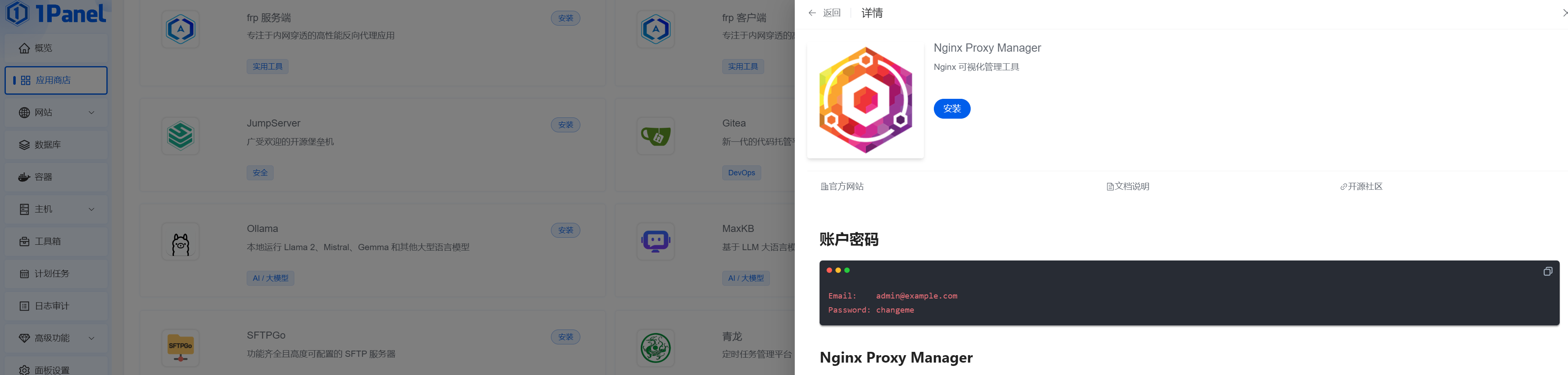
                        <![CDATA[<h1 id="%E6%8A%A5%E9%94%99" tabindex="-1">报错</h1><p>使用腾讯云服务器，搭建了1Panel，使用1Panel中的<code>Nginx Proxy Manager</code>，添加<code>Proxy Hosts</code>后，访问反向代理后的网页出现<code>502</code>错误<br /><img src="/upload/2024/05/image.png" alt="image" /></p><h1 id="%E8%A7%A3%E5%86%B3" tabindex="-1">解决</h1><p>使用<a href="https://github.com/NginxProxyManager/nginx-proxy-manager?tab=readme-ov-file#quick-setup" target="_blank">github nginx-proxy-manager</a>中的quick-setup可以正常工作</p>]]>
                </content>
            </entry>
</feed>